Saturday, 29 September 2012

Shopping For Screens

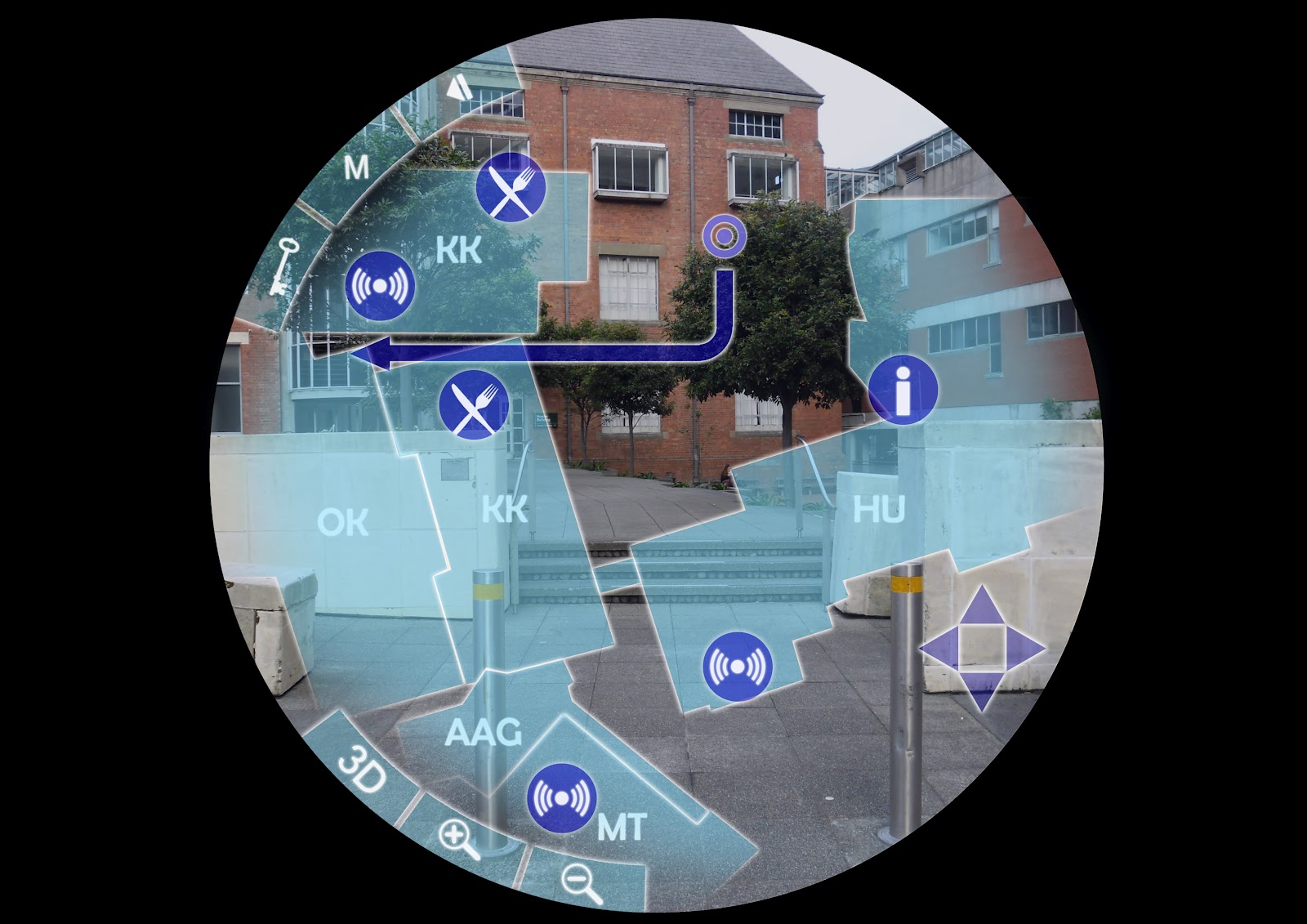
I finally finished the menu screens for my interface and I'm pretty happy with the consistent style. Here are the images in a vague order;
Main Menu

Navigate Menu

Navigational Point of View

Personal Timetable

Options Menu

2D Map

3D Map
All these will have a different list of Keywords to each other which can be called upon for different effects. For the sake of the Flash interface they will active buttons although their aesthetics won't change. I like the small range of colour because if there are only a couple of colours the eye has to remember that are attributed to the menus the less chance they have of blending into the background and becoming invisible. For the maps the level of detail would change with the zoom as well as whether or not the user is inside a building.

Friday, 28 September 2012

DSDN 142 Interim Submission

Today's interim gave me the opportunity to present my work to the class as well as my Tutor and Angela at the same time and receive feedback. What my submission contained was a display of my Fireworks code, the incomplete Fireflies code that used 'jars' and my most recent adaptation of the Firefly code. My goals are to have an interactive environment that has a collection of Fireflies whose behaviour is influenced by the presence of the mouse. As shown in earlier posts, my inspiration came firstly from fireworks then I moved onto fireflies. My code doesn't fully represent fireflies however, as they do not emit a constant glow. In truth they are a type of beetle and only release brief burst of light where my fireflies are like glowing flies.
They functions are that when the big bug (cursor) moves close to the other flies they are repelled by it. By holding the left mouse we can increase the radius of repulsion. The right mouse, although incomplete at the point of submission, was meant to call out to the fireflies, causing them to orbit the cursor.
The code I needed to fix was covered by this storyboard I submitted;
Based on feedback my direction needs to change. I still need to fix the square repulsion issue but the second button function is just that; a button. It is control, not interaction. Do this, get that. Instead I need something that pay attention to the way the user uses the mouse. During the presentation I kept referring to the big bug as "Mama Firefly" but the other fireflies behaviour towards it contradicted its title. Steven suggested that it's more likely that they would try and cling to her like needy children rather than fleeing. I fear this would bring my code too close to the interaction a classmate is doing for 'catching stars'. Angela got more of a predatory impression of the big bug, which is the direction I am thinking of taking it in. A good start would be to give it a more aggressive colour tone (RED!) and maybe have it eat the smaller fireflies it manages to catch. The adjustable repulsion can be replaced with a set value that maybe increases as the predator eats more and more fireflies? The mood of the environment could change too. Perhaps a visible background could darken with the death of each firefly and the colours get more blue as the predator gets redder. Lots to do...

Tuesday, 25 September 2012

The Ol' Switcheroo

Looks like I'm switching to another idea. This is good though; it means progress. My jar/firefly program was having a glitch-fit each time the mouse was clicked several times repeatedly, which is roughly the third or fourth thing an inquisitive user will try. This created some funky patterns but overall was unacceptable.
After talking to Angela we decided that the most interesting and 'realistic' aspect of my code was the behaviour of the firefly objects. The way the jars were presented didn't make much sense so I'm swallowing my pride and ditching the jars entirely.
My new direction is to have the cursor replaced by a giant firefly that can spawn smaller ones from it. The way the user moves the 'Mama', combined with clicks, influences the other fireflies behaviour. We'll see where this one goes...

Monday, 24 September 2012

Walking Forward

Now that the interim presentation has passed it is time to start producing some computer generated interface screens for my flash (ahoy!) presentation. Here are a couple I managed to complete in the studio (The font is yet to be finalised);

Now it's just a matter of cranking out the remaining ones I want to how in my flash animation.

Saturday, 22 September 2012

Fireflies

As adorable as this video is it's only really the last couple of minutes I'm interested in as it gets dark enough that you can see the fireflies clearly. 
One thing that I didn't realise is that their glow isn't consistent and is more of a brief flash than anything. I think for the sake of my program I will keep the glow a constant thing so that users can see the fireflies flying around the screen. If it were just a simple flash then a large portion of the program would be missing.

Their bizarre bodily function results in something truly beautiful :)

Friday, 21 September 2012

A New Direction to Success... Hopefully

My new take on my fireworks code is to be about spawning fireflies. The interaction is when the user clicks on the screen a 'jar' begins to grow for as long as the mouse is held down. As it grows it begins to become more red and the tension builds inside it, causing it to vibrate. When this tension gets too great or the mouse is released the jar holds for a moment then bursts.

While the jar grows it spawns fireflies that at this point in time merely fall to the ground but once I figure out how will orbit the mouse as long as it is held down. Once the mouse is released the fireflies are free to roam as they please.

At the moment there is a problem with the fireflies in that to get them to work it requires a pair of nested 'for' loops that slows the program right down (as it's trying to run the jars as well), visible in the picture above with the unwanted trails behind the falling fireflies. I'll need to look into this to get it to run as smoothly as possible.

DSDN 112 Interim

This bombardment of imagery are the paper prototypes of how my interface will take form visually. The outer ring merely represents the edge of the user's vision through the peep-hole. Anything shaded will still be transparent but there it will have a denser tint of colour. One thing I realised after the interim presentations was that I'd forgotten to put a form of highlighting around the key words. In the digital interface they would most likely come up with a brighter outline, a white border or be more opaque.


This is a better representation of how it might actually look. While there is the option for users to customise the colour scheme to make it easier/more favourable to view. This display has every option active apart from the default Arrows and the Time of Day.
 And for the sake of convenience, here is my wireframe once again.