Here is a little compilation I made of some of the footage that didn't quite make it to the final cut. Looking back on the video there are a couple of things I could have done better. Firstly, after seeing another students work I realise I could have used colour correcting to make my video look better. If I had more time for both shooting and editing I would also have liked to have made my video and soundtrack more synchronous so more cuts in the footage followed the beat of the music. Overall I am pleased with the final result. It feel good to have it all done.
Showing posts with label dsdn112. Show all posts
Showing posts with label dsdn112. Show all posts
Tuesday, 30 October 2012

Monday, 29 October 2012
DSDN 112 Project 2 Part B
Ta-dah!
 It feels like I've left my blog unattended for a while but I feel saying "I'm still editing!" every two or three days would get old pretty fast. But here it is! The complete video advertising my navigational technology; the Peep-hole. The video style is a hybrid of a music video and an infomertial because I needed to explain how the Peep-hole works but also make an entertaining video.
And to think this will be my final submission for first year design... well we're moving on to bigger and better things. Or here's hoping :)

Wednesday, 17 October 2012
Peter Jackson Jr.
Today I got all the filming done for my video. With numerous takes of raw footage I have a variety to choose from to compose my final video. Due to background noise and an error with a microphone I had to retake each line of dialogue as a separate clip so that it would be clear. This will not be an issue though as most lines are delivered either from the point of view of the user (who is off-screen) or the Avatar whom you can't see talk anyway.
Technically this is progress...
Sunday, 14 October 2012
DSDN 112 Project 2 Part B Interim

Note: The image with the earpiece was taken from http://reviews.cnet.com/i/bto/20090323/Apple_headset2.jpg as I tried at several shops but wasn't allowed to handle the headsets to take photos of and something like that isn't quite covered in course-related costs.
Saturday, 13 October 2012
Storyboarding Once Again
This was my opportunity to visualise how my video advertising Peep-hole would go. I had a couple of ideas on different formats; a text-based presentation, a music video, an infomercial or a tutorial. I figured that the Peep-hole is a new technology, therefore would be most easily explained with a visual demonstration of how it works. I want to keep the video exciting so I will avoid an outright tutorial, rather showing viewers the functions in a creative and passive way.


Here is a draft storyboard for how the final clip might run. The plan is to film the shots then overlay the text and icons in Adobe After Effects or something of the like. To create the Avatar I plan to film a friend in a morph suit so they will be easily removed from one scene and overlayed onto my main video.
Tuesday, 9 October 2012
Better Late Than Never
I did some usability testing of my interface over the past couple of days and got a decent chunk of responses many of which address stuff I hadn't even thought of. The first and most glaring is that my 'Back' button is totally a rotated 'Eject'... now I just feel silly.
A good suggestion made concerning the timetable was when the top of the table is reached the arrow for up should fade out. Likewise for the down arrow at the bottom of the page.
 One thing people kept trying to do when on the timetable screen was to get directions by saying the name of the class they wanted to go to. While the system automatically alerts the user of upcoming classes with an adjustable bracket of time (default of 15 mins) if the user performs this action manually it should do it anyway.
While in 'Options' user's natural instinct to increase the volume was to say "volume, up" or "volume, down". In response to this the volume would increase by 5% each time it is told to increase/decrease. The options of "full volume" for 100% and "mute" for "0%" would also be added.
 The same idea applies to the zoom functions of the map with "zoom in" and "zoom out". Another note on the map is the 2D map should be oriented so that the direction the user is facing is adjusts where the buildings appear around the location icon. The buildings the user is looking at would be at the top of the screen and these would rotate as the user turns.
Most people said that navigating (excuse the poor choice of phrasing) the interface was intuitive and the keywords were mostly second-nature. The exception being when people wanted to go to the 2D map from the POV screen they often just said "map".
One idea that came up was that there should be a audio tutorial that plays when the system is first activated. This could explain the 'Back', 'Menu' and 'Key' buttons as several people didn't get what Back and Menu were straight away from their symbols.
Last but not least it was suggested that there be some kind of 'hold' function that allows the contact lens to stay active so if people want to constantly view through their Peep-hole without holding their hand by their head the whole time they can. Whether this would be a keyword or a physical way of putting the ring into the headset is yet to be decided. In fact, the ring could be removed entirely. If the headset was to hold its own power and was rechargeable then there could be a hold button or switch on it that stops all keywords from functioning. This would remove the novelty of the peep-hole gesture but it may be a necessary step. Its a shame I can't actually make this...
 |
| Exhibit A |

While in 'Options' user's natural instinct to increase the volume was to say "volume, up" or "volume, down". In response to this the volume would increase by 5% each time it is told to increase/decrease. The options of "full volume" for 100% and "mute" for "0%" would also be added.

Most people said that navigating (excuse the poor choice of phrasing) the interface was intuitive and the keywords were mostly second-nature. The exception being when people wanted to go to the 2D map from the POV screen they often just said "map".
One idea that came up was that there should be a audio tutorial that plays when the system is first activated. This could explain the 'Back', 'Menu' and 'Key' buttons as several people didn't get what Back and Menu were straight away from their symbols.
Last but not least it was suggested that there be some kind of 'hold' function that allows the contact lens to stay active so if people want to constantly view through their Peep-hole without holding their hand by their head the whole time they can. Whether this would be a keyword or a physical way of putting the ring into the headset is yet to be decided. In fact, the ring could be removed entirely. If the headset was to hold its own power and was rechargeable then there could be a hold button or switch on it that stops all keywords from functioning. This would remove the novelty of the peep-hole gesture but it may be a necessary step. Its a shame I can't actually make this...
Thursday, 4 October 2012
DSDN 112 Navigation Interface Part A
The ‘Peep-hole’ is a collection of new technologies that
combine to make a navigation interface that is both unique and engaging to use.
It consists of a magnetic ring, a Bluetooth headset and a contact lens that
holds a minute screen. When the ring is brought near the head, e.g. through the
iconic peep-hole gesture, it incites wireless power in the headset which in
turn activates the lens. Through the lens we can view a digital world built on
top of our own. We can see the steps we need to take, how long we have, what
shops are open and where our friends are all through the most direct point of
view any interface can offer; our own. The interface itself is traversed by
verbal commands, removing any need for awkward physical interaction. Almost
every aspect of the interface is customizable, from colour scheme to
information available, allowing for users to personalise their experience. A
trademark of the Peep-hole is the option to replace the directional arrows with
an intelligent avatar whose behaviour is altered by a range of available
themes. With the Peep-hole, getting from A to B is no longer a tedious effort
but an entertaining journey.


Pre-Submission Reflection
Having finished my Flash interface and selected my five screenshots I noticed there's still a large portion of my interface that has been left unexplored. Although I expect a lot of this will be covered in the second half of this project I created a couple of alternate colour schemes to show how users can customise the appearance of their Peep-hole;


 The colour schemes that contrast a city-scape one the greatest will be the easiest to see but it's up to the user's preference. After showing Cornelia my work she brought up a valid point about the map frames of my interface in how the transition between the 2D and 3D versions was a bit hard to follow because the location indicator shifted on the screen. The frames I chose to display were selected because they showed off the directional arrow and map well. In the actual interface the default position of the location indicator would be the middle of the screen and from there the user is free to pan around the map. This is what will have happened in both cases shown in the application (the 3D one having been zoomed in as well).
At Cornelia's request I generated another image to show what happens once you reach your destination;
 The Avatar would clearly indicate through their body language and by communicating with the user through the headset that the room has been reached. Upon entering the room the navigational mode would automatically return to the main menu if the user hasn't already dismissed their Peep-hole.
If I was to take this idea further I would have liked to experiment with the aesthetics of the Peep-hole more. Although the technology used to make it possible dictated how the final interface would look there are possibilities with more complicated scroll-based menus and such. Whether or not these would be a more efficient or user-friendly option remains to be tested on account of Peep-holes not actually existing... yet.


At Cornelia's request I generated another image to show what happens once you reach your destination;

If I was to take this idea further I would have liked to experiment with the aesthetics of the Peep-hole more. Although the technology used to make it possible dictated how the final interface would look there are possibilities with more complicated scroll-based menus and such. Whether or not these would be a more efficient or user-friendly option remains to be tested on account of Peep-holes not actually existing... yet.
Tuesday, 2 October 2012
Circles... Circles Everywhere...
Well after yesterday's studio and today's lecture I have decided I need to start over with my Flash interface and refocus myself. My efforts weren't working so I'm going to start from keyframe one and build up from there. Makes sense, right? I reworked the point of view mode and map screens by adding a 'Swap' function (which will be a button in the Flash application) that when activated, cycles from the point of view mode to the whatever map mode was last selected and vice versa. This will greatly improve the usability of the navigational side of the interface.


 I noticed that the 'Overhead Map' button, when selected from the navigation menu, would load without any destination selected and would be unable to provide directions (ahem...) but now with the addition of Swap in the versions of the maps shown above can be accessed. When loaded from the menu the map would merely be a 2D overhead without directions which in some cases people want just to know where they are in general. So everyone is happy. Yay.
I also added a 'Search' menu because originally I was taking such a screen for granted but I really need to show it considering it's a screen people will be using all the time (mental slap on the wrist right there). And I like the aesthetic of it which is a bonus;
 Note: The building codes would be pre-programmed so if someone says "Kirk three-oh-three" then the code pops up in the bar as shown.


I also added a 'Search' menu because originally I was taking such a screen for granted but I really need to show it considering it's a screen people will be using all the time (mental slap on the wrist right there). And I like the aesthetic of it which is a bonus;

Saturday, 29 September 2012
Shopping For Screens
I finally finished the menu screens for my interface and I'm pretty happy with the consistent style. Here are the images in a vague order;
All these will have a different list of Keywords to each other which can be called upon for different effects. For the sake of the Flash interface they will active buttons although their aesthetics won't change. I like the small range of colour because if there are only a couple of colours the eye has to remember that are attributed to the menus the less chance they have of blending into the background and becoming invisible. For the maps the level of detail would change with the zoom as well as whether or not the user is inside a building.
 |
| Main Menu |
 |
| Navigate Menu |
 |
| Navigational Point of View |
 |
| Personal Timetable |
 |
| Options Menu |
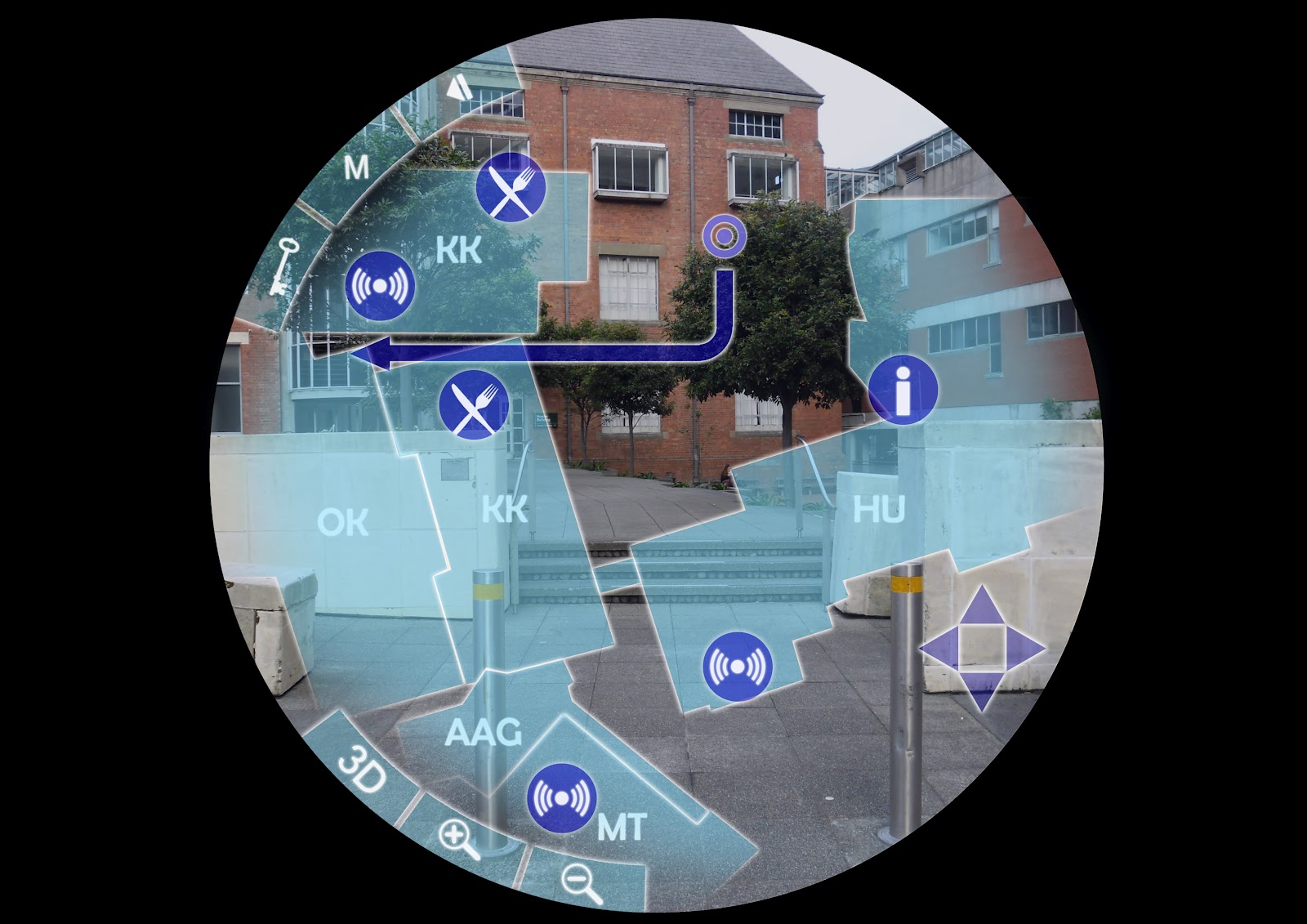 |
| 2D Map |
 |
| 3D Map |
Monday, 24 September 2012
Walking Forward
Now that the interim presentation has passed it is time to start producing some computer generated interface screens for my flash (ahoy!) presentation. Here are a couple I managed to complete in the studio (The font is yet to be finalised);


Now it's just a matter of cranking out the remaining ones I want to how in my flash animation.
Friday, 21 September 2012
DSDN 112 Interim
This bombardment of imagery are the paper prototypes of how my interface will take form visually. The outer ring merely represents the edge of the user's vision through the peep-hole. Anything shaded will still be transparent but there it will have a denser tint of colour. One thing I realised after the interim presentations was that I'd forgotten to put a form of highlighting around the key words. In the digital interface they would most likely come up with a brighter outline, a white border or be more opaque.


Monday, 17 September 2012
Technological Refinements
Having discussed my project in further detail with Cornelia I came to the conclusion that the Peep-hole would be physically comprised of an earpiece, a contact lens and a single ring. With the introduction of the contact lens the second ring became redundant as the holographic imagery would be projected by the lens, not between the rings. The purpose of the ring is now to act as a wireless trigger to activate the lens as it would emit the magnetic field necessary for the wireless power. This would maintain the novelty action of the 'peep-hole' but no longer limits users to that particular motion. It's also a lot easier to find a singular ring that fits, opposed to an index and thumb ring that do.
I did some designs for menu layouts for the upcoming interim submission and found a cool motif that I could incorporate into the general design;
 Considering the peep-hole is a heavily visual interface I like the idea that menu screens would subtly resemble eyes. They would be centred around a 'pupil', the tabs of the menu being the 'iris'. When shifting between menus a line of light would swipe down the screen and erase the current menu, then swipe the other way to reveal the new menu, effectively 'blinking' between menus.
I did some designs for menu layouts for the upcoming interim submission and found a cool motif that I could incorporate into the general design;

Friday, 14 September 2012
Looking Into Things Further

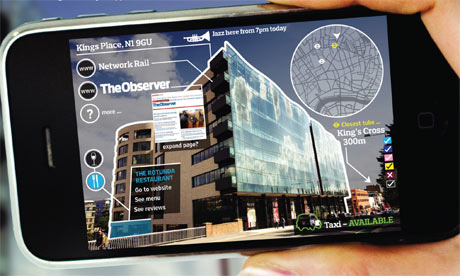
The technology that already exists is impressive and it could be developed in such a way that this could very well be possible, especially considering number 7 and 5 in this video;

It may still be in the prototyping phase but there is a lot of promise. Looking through this lens would allow us to view the world with the virtual data posted on top of it. An article on augmented reality can be found here; http://en.wikipedia.org/wiki/Augmented_reality
Yes it's a wikipedia article but at least they draw their information from viable sources. The idea of augmented reality has been around for a while so this peep-hole idea is nothing too difficult to accomplish, as there is likely more than one way around it.


Thursday, 13 September 2012
The Plan
Just because it's not due doesn't mean it can't be finished early. Here is a kick*** wire-frame that shows the various functions of my navigational interface. I ran with the peep-hole idea because of how convenient it is to get what you want just by raising your hand to your face, no fumbling around in pockets or scrolling through lists of other applications and most importantly no cybernetic surgery. Because of this anything that would have been a button needs to have a keyword that triggers it, therefore anything bordered by dark blue. The permanent keywords are ones that are forever accessible, regardless of user depth within the interface. All others are only active within the menu (or sub-menu, whatever you want to call them) they are an option for. Blue situation keywords are either keywords set by the user or a fraction of a phrase that has more than one effect e.g. "Zoom 20%" the % value is how close the user wants to zoom to.
 Navigate, Timetable, Options and Store are the four primary fields within the interface and can be access from any of the other fields when their keyword is spoken, as long as one of the field's sub-menus (indicated by the blue boxes surrounding them, e.g. 'Add new' and 'Details' are the sub-menus of Timetable) has not been selected. In the 'Display Controls' segment all the options, excluding 'Colour', the options are all on/off functions, saying their keyword activating/deactivating them.
The 'Avatar' function would replace remove directional arrows from the screen and instead a holographic character, the default being a green faceless man inspired by the green man crossing symbol, who leads the user forward and talks to them. This would make the travelling more entertaining. As it is unlikely that users would want to walk around with their fingers around their eyes the avatar would have a signal, the default being a whistle, that sounds whenever a corner or alternate route is coming up, indicating the user should check through their peep-hole.
The Peep-hole, as its commercial title shall be from now on considering that's what I keep referring to it as, would be sold as a pair of rings and an earpiece. This would come with the navigational software (as that's what it was originally designed for) but other software would be available for purchase. These programs would include numerous other applications for everyday tasks; personal organisers, banking, socialising (other Peep-hole users could give of visual signals to their location/status/etc.) and so on and so forth, whatever the demand is for. Other, more playful programs would include ones that alter the environment in the alternate cyber world the Peep-hole allows you to see. People who own them could project holographic clothing and characters for others to see. The possibilities are endless. Unfortunately they are a bit beyond the brief but hey, one can dream...

The 'Avatar' function would replace remove directional arrows from the screen and instead a holographic character, the default being a green faceless man inspired by the green man crossing symbol, who leads the user forward and talks to them. This would make the travelling more entertaining. As it is unlikely that users would want to walk around with their fingers around their eyes the avatar would have a signal, the default being a whistle, that sounds whenever a corner or alternate route is coming up, indicating the user should check through their peep-hole.
The Peep-hole, as its commercial title shall be from now on considering that's what I keep referring to it as, would be sold as a pair of rings and an earpiece. This would come with the navigational software (as that's what it was originally designed for) but other software would be available for purchase. These programs would include numerous other applications for everyday tasks; personal organisers, banking, socialising (other Peep-hole users could give of visual signals to their location/status/etc.) and so on and so forth, whatever the demand is for. Other, more playful programs would include ones that alter the environment in the alternate cyber world the Peep-hole allows you to see. People who own them could project holographic clothing and characters for others to see. The possibilities are endless. Unfortunately they are a bit beyond the brief but hey, one can dream...
Monday, 10 September 2012
Navigation of the FUCHAAAH!
Today's studio really made me think about how I actually want my program to function. Drawing up a draft wire-frame for my interface options put my ideas into words and gave me scope on how much I have to work with; the complexity of the search options, the level of customisation of the program's performance, additional features of the program. I also used the studio to solidify the system on which my program will run, which was necessary for me to progress any further with interface designs.
 These are the four main ideas I had for operating systems. I admit they got a bit space-age by the end. The Smartphone interface would work on any device that has a built in camera but the lower-tech devices would not have access to all the functions. The wristband projected screen would effectively work like a touchscreen as far as physically interacting with it goes. The other two would require verbal command to interact with because there would be no clear way of using your hands to select what you want. Because of this there would have to be a list of key words that have definitive effects that must also be chosen in a way that each word represents its function logically and intuitively.

Saturday, 8 September 2012
Blogging Blitz
Yet another blast of imagery I've found. I feel a bit like Dora calling up all these different maps. Maybe my interface should sing to the user...?


The top right is a button map built up of simple an unobtrusive shapes. Throughout the interface these buttons would be available but subtle enough not to interfere with what's on-screen.
The bottom left is a bit more abstract. The shapes would shift and change in size as the user touches them, the selected ones becoming the largest. They would orbit around the centre when dormant. This is definitely the most futuristic looking menu.
The bottom right menu is far more basic, based on a cityscape silhouette. A ring of triangles would circle the selected spire that hold the different options (the titles in the sketch are merely example. I have yet to decide what options are actually available to users).
I expect once I nail down the details of what happens within my application I'll get a more solid idea on how to arrange it on-screen.
Friday, 7 September 2012
Circles Are Cool
It's pretty much a fact of life. The sky is blue, cows say moo and circles are cool. Curves just make things flow better because they don't mess around with any of this 'corners' nonsense. And so I found so pictures of already existing interfaces that revolve around circles to get some more ideas on layout and shape;


Whatever is going on here it looks cool. Why? Because it's composed of circles. Circles within circles!

I like the layout of this one for something like a primary menu, with smaller transparent tabs or buttons to select. The brightness of the centre draws focus to it as it uses the brightest colours (tinted white) but it is also the most solid part of the menu.

This shows how something like buttons could be used in tandem with a rotating slider or something. The wider the range of movements used in the interaction, the more interesting the user's experience will be.

There's something about the simplicity of this one that I like. Perhaps the drop-down menus could be attributed to different colours that become more dominant when selected.

I like the idea of using a trail of footprints as a loading bar. So here are some pictures of icon prints, however, I don't think a trail of kisses would be appropriate.

I also started looking into colour schemes as well. Considering it's a navigation system we're designing for it is expected that at some point the user will be outside so a 'natural' colour scheme could look rather cool. The second image shows how brighter, but still natural colours could be used.


And considering it's Victoria University a cityscape colour scheme would also be appropriate. Looking at some picture of cities they tend to be somewhat grey. The odd blue highlight could spice things up a little bit though.


Subscribe to:
Posts (Atom)